Home | Site map   

Home

Products

Downloads

Support

Contacts

ASPRunner.NET:  Overview | Try now | Buy now | Tutorial |  Screenshots | Live demo | FAQ | Articles | Forum
 
  How to download and install ASPRunner.NET
 

Thank you for downloading ASPRunner.NET, the ASP.NET code generator that saves you time and money building ASP code for your database that nomally takes days in several minutes.

ASPRunner.NET is safe and easy to install, and easy to use. The following steps need to be carried out to install ASPRunner.NET:

Step One � Download and Save the ASPRunner.NET to your computer.
Step Two � Install the ASPRunner.NET.
Step Three � Start using the ASPRunner.NET.

Step one - download and save

First point your browser to http://www.xlinesoft.com/asprunnerpro/download.htm
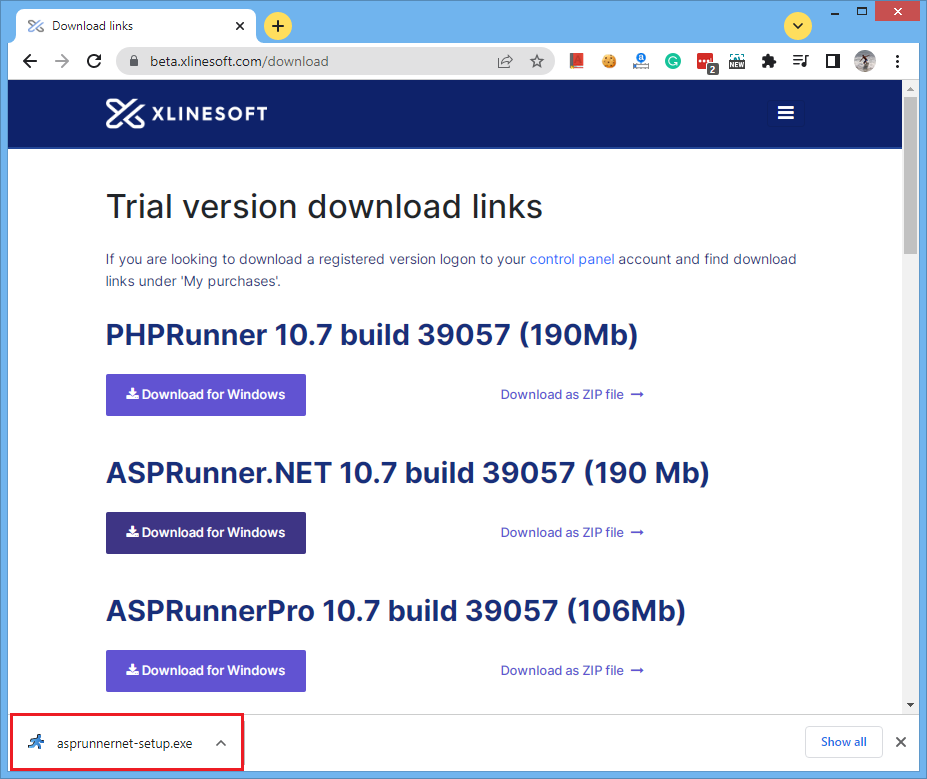
Click on download link saying ASPRunner.NET - self-installing

You may be asked if you want to save the file or run it from its current location. If you are asked this question, select "Save." If not, don't worry -- some browsers will automatically choose "Save" for you.

Starting download

You will then be asked to select the folder where you want to save the program or file, using a standard "Save As" dialog box. Pay attention to which folder you select before clicking the "Save" button. You can save this file to your desktop to make it easy find it after download completed.

The download will now begin. Your web browser will keep you updated on the progress of the download by showing a progress bar that fills up as you download. You will also be reminded where you're saving the file.

Note: You may also see a check box labeled "Close this dialog box when download completes." If you see this check box, it helps to uncheck this box. You don't have to, but if you do, it will be easier to find the file after you download it.

Download progress

Step two - install the ASPRunner.NET

Depending on which file you're downloading and how fast your connection is, it may take anywhere from a few seconds to a few minutes to download. When your download is finished, if you left that "Close this dialog box when download completes" option unchecked, you'll see a dialog box like this one:

Download progress

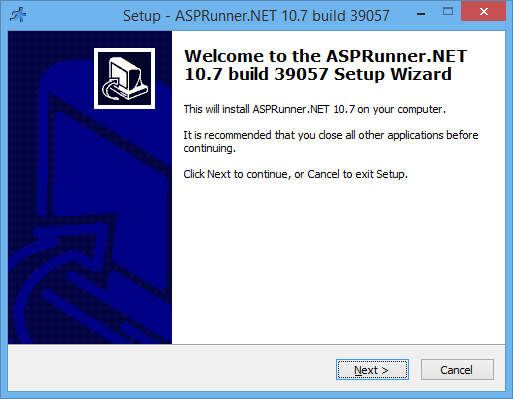
Now click the "Open" button to run the file you just downloaded. At this point the installation program for the file will launch, so just follow the on-screen instructions from there to install this application on your computer. If you don't see the "Download complete" dialog box, just open the folder where you saved the file and double-click on the icon for the file there.

Step three - start using the ASPRunner.NET

After ASPRunner.NET is installed on your computer you can run it by double-clicking on it's desktop icon or by clicking Start -> Programs -> ASPRunner.NET -> ASPRunner.NET.

Feel free to contact us if you have any questions installing or using ASPRunner.NET.
World Wide Web: http://www.xlinesoft.com
E-Mail: support@xlinesoft.com


Home | Products | Downloads | Support | Contacts

Customer quotes

Once again I want to tell you how impressive your software is. I am a computer applications teacher in the school so I don't know how much praise from me means to you. All I can tell you is that it is wonderful to find software that is easy to use and works so well.

Ian Roller
Ireland

What I needed to do was build a members log in area for a web site that the user could update as new people joined. He wanted this done in two days. With not much time I downloaded this software and had the lot done in under 3 min. Normal time for this would be about 5 days and even then you would still be debuging your scripts.

Richard Murray
Web developer

Contact us:

Xlinesoft.com
Herndon, VA 20171, USA

  1-888-290-6617
  support@xlinesoft.com

  © 1999 - 2005 XLineSoft. All rights reserved. All comments send to webmaster@xlinesoft.com