When your projects do not work as expected, especially when you use lots of events and custom code, you can use the following debugging techniques to resolve the issue.
Print extended debug info on the web page
To enabled extended debug info, add the following code to the AfterAppInit event:
$dDebug = true;
Once this option is enabled, your application will print all SQL queries it executes, output from third party REST requests and also a full email sending (SMTP) log.
Note: Outputting SQL queries or other debug info will break AJAX functionality like buttons, field events, popup windows, lookup wizards in AJAX mode etc.
You can copy the SQL query and run it against your database manually to see if it returns correct results.
To run an SQL query manually, use the tools that come with the database (Query designer in MS Access, Enterprise Manager in SQL Server, phpMyAdmin in MySQL).
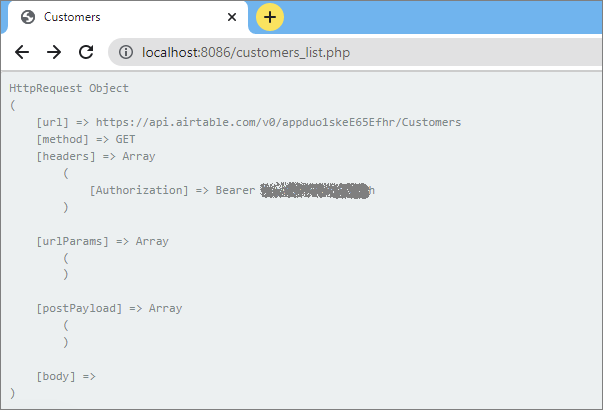
This debug info setting will also apply to REST Views. Once this option is enabled REST View pages will output all requests sent to the REST API provider.
Print out variables using the echo statement
The echo command is used to write output to the browser. The following example sends the text "Hello World" to the browser:
echo "Hello World";
Here are several examples of how you can use this command:
Print the value of the variable
echo "Variable name: " . $variable;
With BeforeAdd/BeforeEdit events, you can print form field value
echo "field_name: " . $values["field_name"];
Note: visit the corresponding articles to learn more about BeforeAdd/BeforeEdit events.
Displaying a session variable that stores the authorized user's ID
echo "UserID: " . $_SESSION["UserID"];
Displaying the IP address of the authorized user
echo "Your IP address: " . $_SERVER['REMOTE_ADDR'];
Print all values in the array
echo "all entered values: ";
print_r($values);
See also:
•Troubleshooting custom buttons
•Troubleshooting JavaScript errors
•Events: After application initialized
•Save user data in session variables
•Improving performance of your web applications
•Troubleshooting web applications